
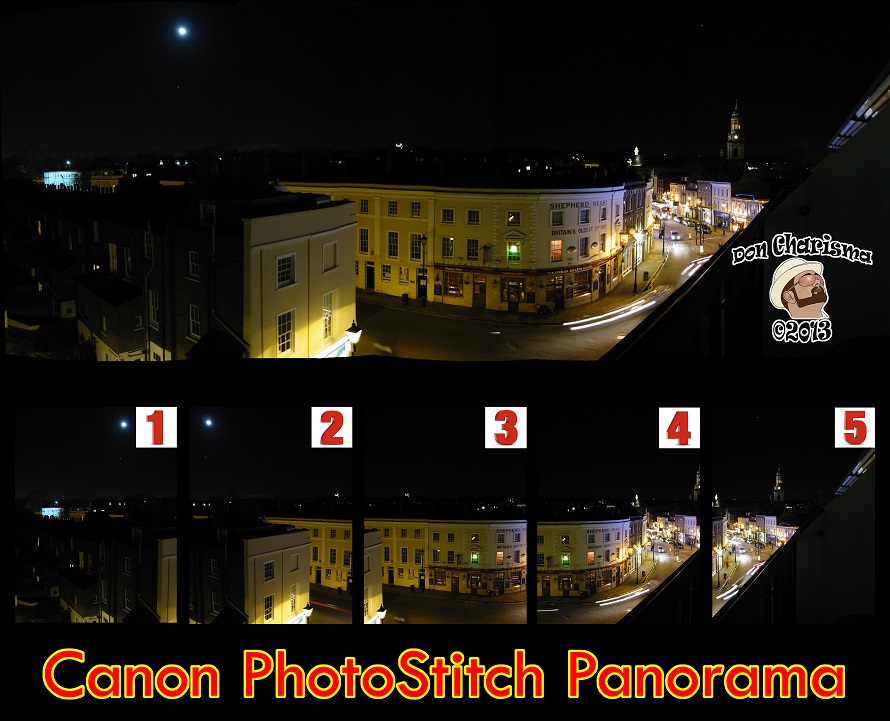
I’ve owned several Canon digital cameras over the years, which have all come with a “free” utility called PhotoStitch.
PhotoStitch isn’t the most feature packed or the newest software, but it does work well, made by a well respected company. It can do Panning (Scenery etc), Parallel Camera Movement (Documents etc) and Images scanned in sections.
I’ve tested it with Photos taken on my iPhone 4s and it seems that the pictures don’t have to be taken on a Canon camera.
Update Mar-2014 – I’ve just written about alternatives to Canon Photostitch, so you might want to check them out in my article – “Panorama Stitching Software – Alternatives To Canon Photostitch”
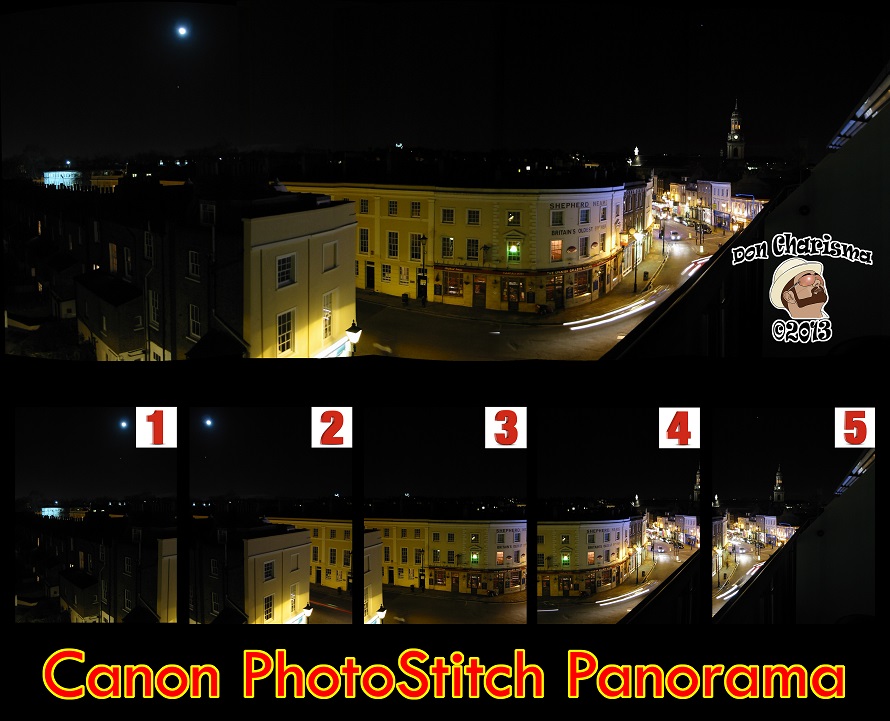
Reason that I’m writing about this, is that ten years after taking some Panoramas, I wanted to stitch them together. I didn’t have the install CD or the camera or the software any more. After much hunting high and low, I found it’s possible to install PhotoStitch for free.
Here’s how :
1. Download the Canon PhotoStitch Updater 3.1.23 (see links below) filename will be “psw-upz-3-1-23-47-r7-u01-9l.zip”
1A. If you already have Photostitch installed then skip to step 4.
2. Make a new text document, save as “canon_or_whatever.txt”, then rename to “canon_or_whatever.reg”, contents :
Windows 7 32bit –
Windows Registry Editor Version 5.00
[HKEY_LOCAL_MACHINE\SOFTWARE\Canon\EOS Utility]
[HKEY_LOCAL_MACHINE\SOFTWARE\Canon\DPP]
[HKEY_LOCAL_MACHINE\SOFTWARE\Canon\ZoomBrowser EX]
[HKEY_LOCAL_MACHINE\SOFTWARE\Canon\PhotoStitch]
[HKEY_LOCAL_MACHINE\SOFTWARE\Canon\EOS Capture]
[HKEY_LOCAL_MACHINE\SOFTWARE\Canon\EOSViewerUtility]
[HKEY_LOCAL_MACHINE\SOFTWARE\Canon\ODSK]
Windows 7 64bit –
Windows Registry Editor Version 5.00
[HKEY_LOCAL_MACHINE\SOFTWARE\Wow6432Node\Canon\EOS Utility]
[HKEY_LOCAL_MACHINE\SOFTWARE\Wow6432Node\Canon\DPP]
[HKEY_LOCAL_MACHINE\SOFTWARE\Wow6432Node\Canon\ZoomBrowser EX]
[HKEY_LOCAL_MACHINE\SOFTWARE\Wow6432Node\Canon\ZoomBrowser EX\Settings]
[HKEY_LOCAL_MACHINE\SOFTWARE\Wow6432Node\Canon\ZoomBrowser EX\Install]
[HKEY_LOCAL_MACHINE\SOFTWARE\Wow6432Node\Canon\PhotoStitch]
[HKEY_LOCAL_MACHINE\SOFTWARE\Wow6432Node\Canon\EOS Capture]
[HKEY_LOCAL_MACHINE\SOFTWARE\Wow6432Node\Canon\EOSViewerUtility]
[HKEY_LOCAL_MACHINE\SOFTWARE\Wow6432Node\Canon\ODSK]
3. Double click on the “canon_or_whatever.reg” file and accept changes when asked by the User Control Account. This puts “dummy” entries in the computer’s registry so installer thinks PhotoStitch is already installed.
4. Run the installer for Canon PhotoStitch Updater 3.1.23. This will either update existing software, or if you’ve patched the registry, then will install from scratch.
5. You should be good to go, if not, or you’re a Mac user, then there is a little more detail here.
Tips for using
1. There are features tucked away behind buttons, so take some time to familiarise with all the functions
2. Pictures need to be ordered correctly for Photostitch to work, so you’ll need to reorder if not already in exactly the correct order, left to right.
3. When the join isn’t quite right you can use the “Display Seems” and match corresponding parts of photos manually. Two options drag and drop the whole left photo onto right or match up small square sections.
4. Saving in Photoshop .psd files seems to give higher quality images.
5. I found a video tutorial here, if you have the patience to listen to the guy talking !
ENJOY:)
Resources
Install Canon camera software without the CD
Canon PhotoStitch Updater 3.1.23 (Australian Website) Win 7 & 8 (32 & 64 bit)- http://support-au.canon.com.au/contents/AU/EN/0200246607.html
Canon PhotoStitch Updater 3.1.23 (UK Website Website) Win 7 & 8 (32 & 64 bit)-http://www.canon.co.uk/Support/Consumer_Products/products/cameras/Digital_Compact/Powershot_S_series/PowerShot_S70.aspx?DLtcmuri=tcm:14-998350&page=1&type=download
Canon USA Website- http://www.usa.canon.com/cusa/support/consumer/digital_cameras/powershot_s_series/powershot_s70#DriversAndSoftware

 Don Charisma
Thanks for the follow and the information is always good to know. Thanks again.
You’re very welcome 😀 … and happy you found this useful …
Well, geewhiz, I wish I’d seen this blog post a month ago. But my stitch-assist app was only $5, so I can’t complain too much. Thanks for following my blog. Best wishes, Melissa 🙂
No harm in having more than one tool 😀
Great information. Thanks for sharing. And, thanks for following. I really appreciate you stopping by.
You’re very welcome 😀
Reblogged this on bertpowers.
Thanks for the reblog 😀
Reblogged this on KCJones and commented:
Great ideas from Don
Thanks for the reblog 😀
Great tips. Thanks for your efforts. And, thank you for following Photomania. I am honored. 🙂
Hey Ron, you’re welcome and you’re welcome !
Reblogged this on Ice Mountain Pictures and commented:
Good Info!
Thanks for the reblog 😀
Reblogged this on I-NETRADIO.
Thanks for the reblog 😀
Thanks for the follow. 🙂
You’re very welcome 😀
Is there something like this for Nikon?
There’s a link in the post to alternatives have a look there … I also neglected to mention Autostich, which I came accross recently and had the same level of simplicity as Photostich … plenty to choose from there, Nikon I’m fairly sure don’t do their own software …
Many thanks! Couldn’t find the CD anymore… easy and quick solution thanks to you!
You’re welcome, don’t forget to check out the alternatives such as MS ICE and Hugin …
thanx Don, just like you i already owned the software and been looking for it.
now i have it back again thx a bunch 🙂
You’re very welcome, and thanks for letting me know this was useful 😀
Thanks for the ICE heads-up!
You’re welcome 😀
Hi Don!
I think photo stitching is a great idea & would have never thought about doing this on a computer. I have tried doing it with regular photos into crochet or other types of stitching. It isn’t easy either. Photo stitching to me helps to fix a puzzle & make your pictures come out sweet to show others the bigger picture to get better details than when broken up in smaller picture forms. Very cool!
Rodney
Hey Rodney, you are very welcome … I’ve tried the hand stitching and it’s time consuming and challenging … the software makes it much easier … check out the link I put which gives alternatives to Photostitch, there’s quite a lot of free software out there 😉
Cheers
Don Charisma
Yea it is!
lol!
Well now you have all the info to save time 🙂
Thanks Don & for the follow of my blog & reading my posts too! Sorry I get lost in thought & forget to thank others at times as times with me are tough as well.
Rodney
Hey Rodney, you are very welcome dude … take life as is right for you my friend, now pressure from me … warm regards Don Charisma
Hey, Don. I like your page, and thank you for following my blog.
You are very welcome my friend, lovely to hear from you 🙂
Don, thanks for following my Enos Mills blog. I’m rather new at this blogging thing, but I’m glad to find your site interesting!
Hey, you are very welcome, and don’t worry we were all once new at blogging ! Cheers DOn Charisma
Thank you for for following and the great software information – really appreciated – I cannot wait till I am back using the equipment
YOu are welcome, and I hope you’re back using the equipment soon 🙂
Your “About Me” Blog was interesting and you’re popular (comments were closed). Anyway, I appreciate your taking the time to read my Blog. God Bless You. I don’t know that money is easy to get but I do know that is hard to keep. 🙂
You are welcome and lovely to hear from you … I’m gradually reorganising the blog, improving etc …
As for the money depends on your perspective, but yes fully know how you feel a lot of the time !
Warm regards
DC
Thanks so much for following sciencesprings. I appreciate it very much.
You are welcome 🙂
You just started to follow the musicsprings blog. This blog has been dormant for a long time. Thanks. If you are interested in science, you might try my sciencesprings blog, http://sciencesprings.wordpress.com
Ah, followed a dormant blog ? Oh well, nevermind I’ve followed your new one 🙂 cheers DC
thanks …
You are very welcome 🙂
Hello, Don. An interesting article. I’m so computer challenged. Also, thank you for following me. I’m following you now. Have a lovely day.
Hey Beverly, thanks, I posted this a while ago and it’s been very popular article … have a look around I also do photography, opinion and SEO to name three ! warm regards DC
thanks for viewing and following…i like your blogs!
You are welcome, warm regards DC
Thanks for the follow mate.
You are welcome dude 🙂
Great blog it helped a lot. I think I must take a photo with my cell phone on cartoon, then I can also use it for an Avatar. 🙂
You should it’s great fun …
Thanks for following. I could sure use your skills.
You are welcome 🙂 warm regards DC
Thanks for the follow on “depressionsgift.com”. I’m very new to photography and would love to get better. Hopefull your blog will help. Thanks again.
Hey Rebecca, you are very welcome, and yes I can see the gift in depression, very apt title for a blog 🙂
Have a look around on my blog, I’m not a photographer, but managed to shoot and publish many beautiful photos taken only on my iPhone 4s
Thanks for following me back by the way.
Happy new year
DC
Thanks, Don, for ff. my blog. Interesting site.
You are welcome, thank you and lovely to have you on board 🙂 warm regards DC
Whatever program you want to use : take care all images do have the same settings ….. avoid “auto” mode , because every image can have another exposure time , aperture and light setting . Use a tripod to have all images in line . For the rest : useful blog 🙂 , nice for those who are not that familiar with this great camera and software !
True and good advice … I’m limited to iPhone, and don’t think I can set exposure etc, so just do the best that I can … warm regards, keep in touch DC
Haha , I have an Iphone too , the 4S and surprisingly it has already a build in feature : panorama ! Works fine 🙂 ……… and in the end some easier to use . For real high resolution I still prefer the Canon .
Awesome, so you’re all set then 😉
Many thanks for following my blog. I’m in awe of anyone who understands what their doing with photography. I need all the help I can get. Superb!
Hey Allison, thanks and you are welcome … I like to try my hand at a bit of photography, it’s fun !
Thanks for visiting my site so I could find yours! Love the post–something I’d like to try…
You are welcome, and thanks to you same 🙂 … There are some alternative to Photostich, I use PTGui Pro a lot as it’s the best I’ve found, so far…
Reblogged this on quirkywritingcorner and commented:
helpful technology info
Not to meet you here, and thanks for following my blog. I must admit, when I looked you up and saw ‘stitching,” I first thought, Hmmm, a guy who stitches needlepoint. (eye roll) That’s how technologically non-proficient I am. But fun to see that people like you figure out this complicated stuff!
I have many eons ago done some needlepoint, but these days my sewing needs are met by a lovely lady who makes embroidery badges … good to hear from you keep in touch DC
Oh my gosh, it actually DID download Photostitch! I am simply the least computer-savvy person I know, so it took me awhile to figure out your directions, but when I did, it downloaded literally in a few seconds! Thanks for posting this!
My pleasure, Photostitch is pretty solid software with good photos put into it, for best results probably save as a PSD for straight into Photoshop … Don’t forget Photoshop also has a panorama facility, and there’s a free software called Hugin that’s very capable … Microsoft ICE also worth looking at … personally I mostly use PTGui pro as it’s been the most reliable of all the software I tried, but I use the others from time to time too …
Warm regards
DC
Wow, thanks so much for the tips and resources — I’ll have to check into those programs!
You are welcome:)
hey, thanks for your info on photostitch, useful and thanks for your appreciation on my drawing!
You are most welcome:)
I’ve never actually use this feature with my Canon. I don’t make a lot of panoramas but I may have to give this a try.
I have some Panos I took 10 years ago and stitched together recently … It’s a little time consuming, but results can be worth it 🙂
Thanks, kid! Thanksgiving in Nebraska this year has given me nice landscapes, and I needed a better way to construct a panoramic image than the manual method I used yesterday! Horrible. I remembered the Photostitch software but wasn’t sure what to do. You saved me. Happy Thanksgiving!
The other free route is Hugin, I will be installing myself quite soon … Photoshop can do Panos also if you have that, and I believe GIMP can do Panos too … and you are welcome, warm regards DC
thanks for the info, I’ll have to try this 🙂
It’s well worth doing. I also use Photoshop and PTGui for photostitching and will install Hugin (free) as there’s been a recent new release.
I tried PhotoStitch a while ago. I had to uninstall it. I kept getting pricked with the needle. I got my keyboard all bloody and it was a mess to clean up. That’s the last time I’ll buy something for a dollar on Craig’s List. I should have known something was wrong when I saw the red stains on the box.
You’ve got a good sense of humour Ron, thank you 🙂
My pleasure.
Thank You for following my blog !!! 🙂 *Cynthia
You’re welcome 🙂 warm regards DC
Thank you for the follow!
You are most welcome, and thankyou for following Don Charisma … keep in touch, warm regards DC
Reblogged this on Photos That Inspire Words.
Thanks for reblog:)
You inspired me to create the site in the first place Don! Did you read my first post on Computer User’s Forum?
You are mentioned in it.
Paulette M.
I did, well happy for that … and thanks for the mention Paulette … we’re like two peas in a pod 🙂 Cheers DC
🙂
Do you look anything like that picture of you?
Yup, very much, it’s hand drawn myself from an original photo …
Would love to see what you really look like one day. It would be cool to see the man behind the mistique. 🙂
Paulette Motzko
Perhaps one day. I’ve chosen to work like this as it suits me at the moment, maybe I will change later … warm regards DC
That is fine. Just a personal preference. To each their own. You are a good artist if you drew that. Do you have examples of something you have drawn or painted?
Yup, my preference at the moment.
I also did a drawing of my girlfriend, https://doncharisma.org/2013/08/16/miss-charisma-cartoonize-my-girlfriend-another-two-days-of-cartoonification/ and my original post on cartoonify’ing myself – https://doncharisma.org/2013/07/10/two-days-of-cartoonification-how-to-cartoon-yourself-or-myself-or-whatever/
Have some other drawing projects in mind, it’s just finding the time and opportunity really. Been busy with my photography at the moment, will probably switch lanes again soon !
Warm regards
DC
Thanks for the link Don.
I will look at the site about how to cartoon yourself….
Paulette Motzko
My pleasure, and the links are for this site:) warm regards DC
For a technophobe like me it’s all Greek but I do recall my little Canon P&S did a good job at stitching… now, if only you can point me in the direction of some free Nikon stitching utilities! 😉
You could use Canon photo-stitch with Nikon camera, should work fine. There is also something called Microsoft ICE (Image Composite Editor) which works quite well (and free). Hugin is free and quite decent, basically the free version of PTGui. Photoshop has photomerge built in, and that gives very good results. GIMP is the free alternative to Photoshop, and that can be adapted to do panoramas (I haven’t tried myself).
Personally I use PTGui pro, Photoshop, and less often Photostitch and ICE. PTGui Pro is the best all round. However I have yet to find a total perfect solution …
Don’t Nikon provide any Photostitching software ?
Warm regards
DC
Thank you for following my blog.
You are welcome, keep in touch, cheers DC
Wonderful article. I have a canon and I’ll use this info. Thanks for your visit and follow.
Hey Mary, lovely to hear from you. You are welcome as regards follow and thanks for following me back:) Keep in touch, DC
Thanks for following the Pen’s Might. This look pretty cool and interesting, but I’ll need to come back and look in detail later.
When you have time, no rush … warm regards DC
wow
Free stuff !
Reblogged this on Amazing Thai Knick Knacks and commented:
Pretty cool resources if you like taking pictures 🙂
Thanks for the reblog, always much appreciated:) warm regards DC
Thanks for not minding the reblog 🙂 I love all the cool photography tricks and tips.
Honestly reblogging my stuff helps me – so I never mind anyone reblog for me, happy for you to anytime you want to:)
Thanks so much 🙂
Please feel free to reblog, retweet, share on facebook whatever you like from my site, it helps me a lot:)
Great, thank you very much! I was in the same predicament as you – had it bundled with a Canon camera but don’t have the installation CD with me. Worked perfectly! Thanks for posting.
You’re welcome … It’s a great piece of software for “free”, Photoshop also does panorama and there Microsoft ICE too …